

MY SCOPE
Research · UX Strategy · Interaction Design · Prototyping
PLATFORM
Mobile + RFID Handheld

HEALTHCARE ASSET MANAGEMENT · MOBILE + RFID
Making critical hospital equipment easier to find, track, and manage
I designed an RFID-powered mobile experience that helps hospital teams tag, locate, track, and maintain medical equipment across rooms, departments, and facilities.
ROLE
Lead Product Designer
PRIMARY USERS
Biomedical & Hospital Operations Teams

01. The Problem and Context
Critical medical assets were constantly moving, but teams had no reliable way to know where they are.


THE CORE PROBLEM
The hospital didn’t necessarily need more equipment.
It needed better visibility into the equipment it already owned.

Teams physically searched rooms and floors or asked hospital staff if they had seen the missing equipment.
BEFORE RFID
02.What I Learned from Users
Finding an asset was only one part of the problem.
As I spoke with biomedical and hospital operations staff, I realized that asset visibility broke down at multiple points in their day-to-day workflow.
LOCATE
Where is the asset?
Equipment frequently moved across rooms and departments, leaving staff to physically search rooms or ask other teams where it was last seen.

TAG

How do I reliably identify it?
Existing hospital asset IDs were not connected to a trackable RFID identity. I needed a reliable way to link each physical asset to its RFID tag.
MAINTAIN

Is it ready and safe to use?
Biomedical teams also needed visibility into which assets required scheduled servicing, what was overdue, and whether maintenance informaton.
RECORD

What happens when a tag is lost or replaced?
A damaged or removed RFID tag could break the connection between the physical equipment and its digital record.
03. Designing for the Physical Enviornment
The interface had to work with the hardware — not around it
Before designing the interface, I spent time understanding how hospital staff physically interacted with the RFID handheld during their day-to-day workflows. The device was used while moving through rooms and departments, so the experience needed to support quick scanning, clear feedback, and minimal interaction.
Touchscreen
Used to select tasks, review asset information, and complete actions.
RFID Reader
Detects RFID tags and provides signal information as staff move toward an asset.

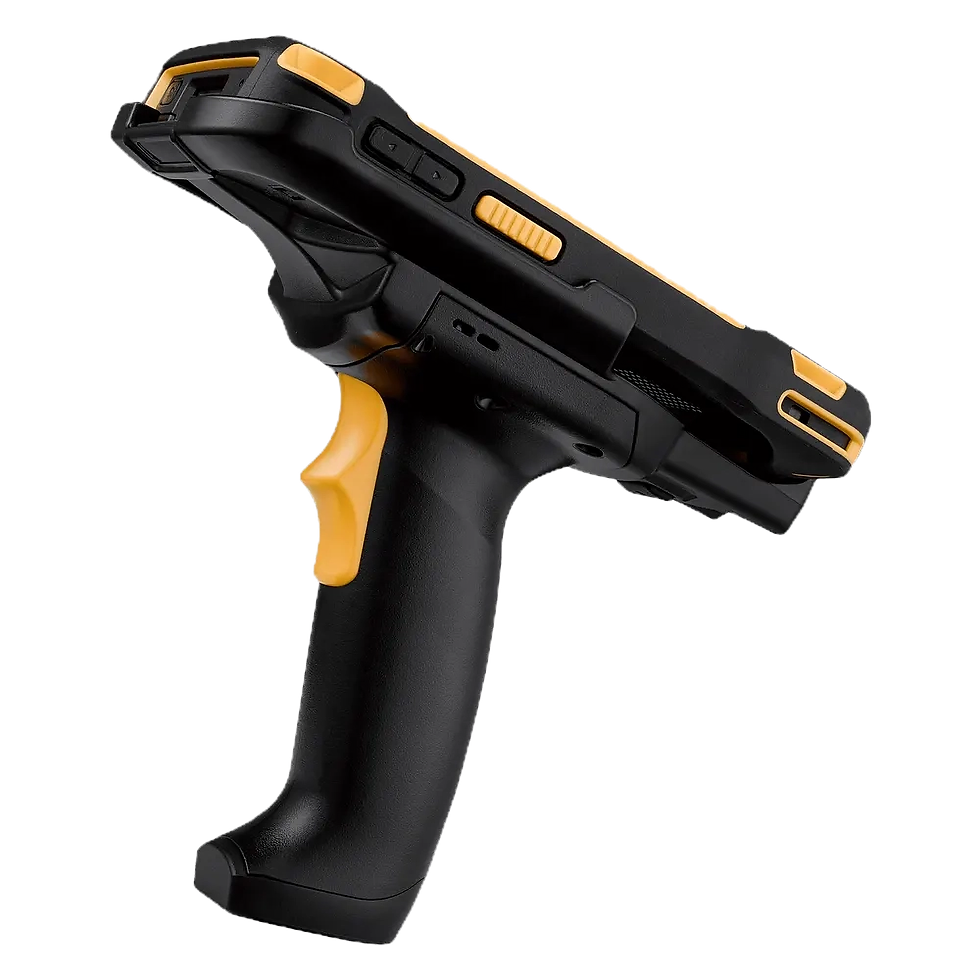
PHYSICAL TRIGGER
Used to activate RFID scanning without relying on the touchscreen.
Design Implication
Large, clear touch targets
I prioritized easily tappable actions and reduced unnecessary interaction while users were moving.
Clear system feedback
I used visible scanning, detected, success, error, and confirmation states so users always knew what had happened.

The handheld wasn’t just the device displaying my interface — its physical behavior shaped the interaction model.
Trigger-first scanning
I designed scanning around the handheld’s physical trigger instead of forcing users to initiate every scan from the touchscreen.
Persistent hardware status
I surfaced RFID scanner connectivity and readiness within the interface so users could verify the device before starting a workflow.
04.STRUCTURING THE EXPERIENCE
I started by mapping each task independently
Before defining the product structure, I mapped each workflow independently to understand the actions, information, and decisions required at each step.


PREVENTIVE MAINTENANCE
Move from finding an asset to servicing it
Asset Tagging
Create a reliable physical-to-digital link

Locate Asset
Find and retrieve equipment


05.THE PATTERN THAT EMERGED
As I mapped each workflow, I noticed that despite different user goals, the interactions followed the same underlying structure:
STEP 01
SELECT
Users establish what they want to work with an asset to locate, equipment to tag, or a maintenance task to complete.
STEP 02
ACT
The handheld and interface work together as users scan, locate, tag, or service an asset.
STEP 03
Confirm
Clear system feedback helps users understand what happened before they confirm or record the result.
Different tasks. One predictable interaction pattern.
06. THE FINAL EXPERIENCE
Asset Locator - Find Equipment

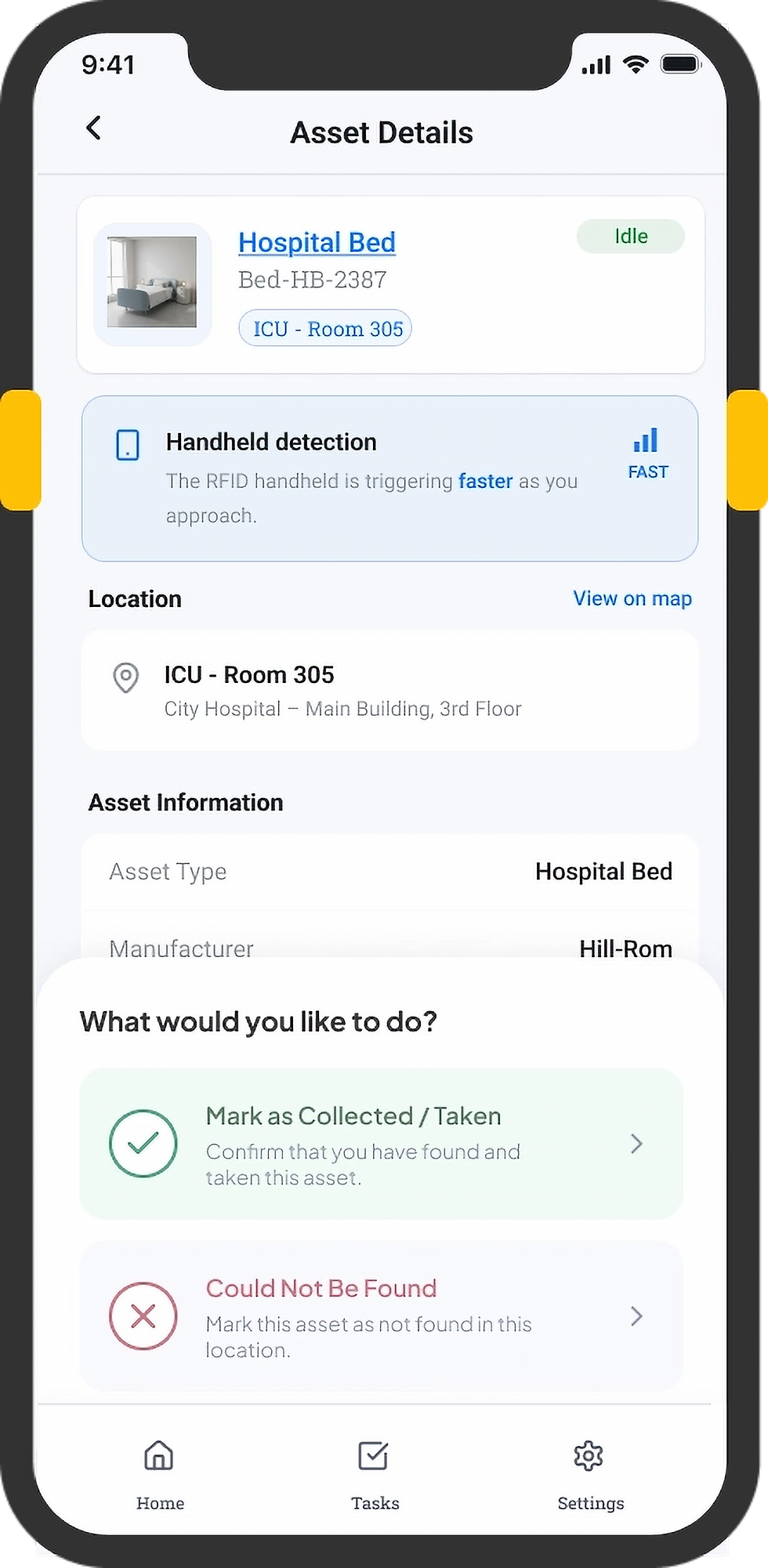
SELECT LOCATION
Define the search area using a location QR code or manual selection.
Start Scanning
Scan nearby RFID signals and surface assets by proximity.
Follow Signal
Confirm Asset
Verify the equipment and record it as collected.
01
Scan RFID Tag
Detect the RFID tag and establish its unique identity.
Scan the physical asset that should be linked to the detected tag.
Scan Asset
Link Tag to Asset
Review the tag, asset, and location before creating the association.
Confirm Update
Create the physical-to-digital link and record the assignment.


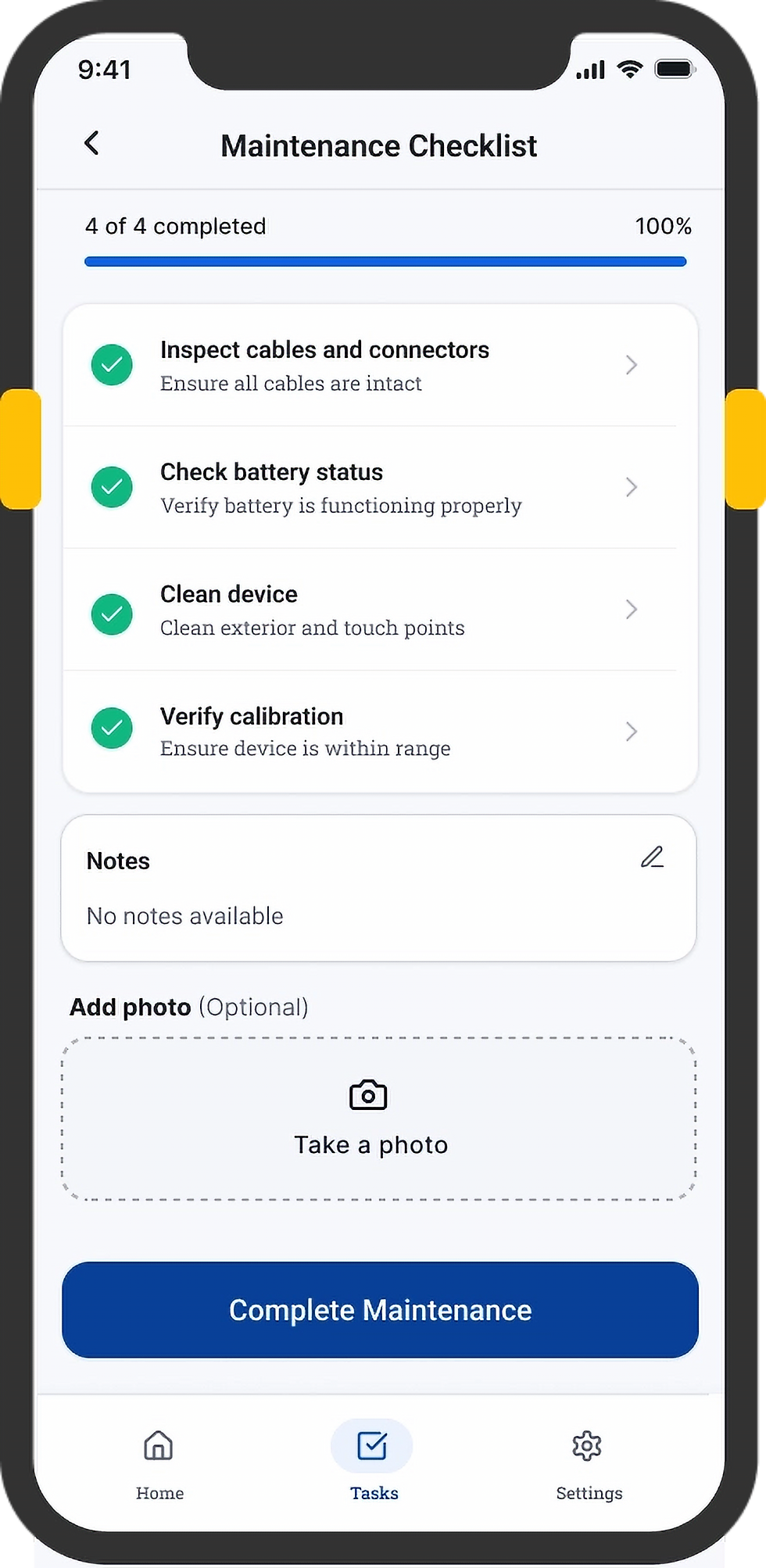
Surface due and overdue maintenance work by asset and location.
View Tasks
Select Asset
Confirm the correct equipment before beginning service.
Work through required maintenance steps and capture supporting details.
Perform Maintenance
Record the completed service with user, time, location, and work order details.
Log Completion



Bringing the pattern to life across three core workflows
I translated the shared interaction pattern into three guided workflows, using consistent interaction principles while adapting each experience to the task at hand.
Guides staff from defining their search area to discovering nearby equipment, following RFID proximity feedback, and recording the outcome.
02
Asset Tagging - Link RFID to Physical asset
Guides staff through scanning an RFID tag, identifying the corresponding asset, reviewing the association, and confirming the link.
03
Preventive Maintenance - Actionable maintenance work
Helps biomedical teams identify due service tasks, verify the correct equipment, complete required checks, and record maintenance completion.
Edge Case:
Reassigning RFID Tags
I designed a reassignment flow for situations where an RFID tag was removed, damaged, or replaced. Instead of creating a new asset record, staff could verify the existing asset, scan a replacement tag, and confirm the new association.


07. IMPACT
Measuring success beyond launch
After the pilot, I evaluated workflow behavior, field observations, user feedback, and stakeholder reviews to understand whether the experience was actually reducing friction in day-to-day asset workflows.
01 - Less manual searching. More guided retrieval.
Users could use changing proximity feedback to understand when they were moving closer to an asset, instead of repeatedly checking rooms or relying only on recorded location data.
How I validated it?
Pilot observation + workflow behavior
02 - Three different workflows followed one predictable interaction model.
Instead of teaching users a different interaction for every operational task, the product reused the same structure across workflows—reducing the amount of relearning required as users moved between tasks.
How I validated it?
Cross-workflow review + user/stakeholder feedback
What I looked for?
Could users narrow their search using the RFID feedback and confidently identify the correct asset?
What I looked for?
Could users move between locating, tagging, and maintenance without having to learn a completely different interaction pattern?
Signal observed:
Users were able to follow the proximity feedback from scan → approach → verify → collect, supporting the core interaction model we had designed.
Signal observed:
The shared structure held across all three workflows and gave us a reusable foundation for expanding the handheld experience.
08. KEY LEARNINGS
Designing for physical workflows changed how I think about simplicity.
Design around the physical task, not just the screen
RFID interactions taught me to consider what users are doing between screens — walking, scanning, locating, and handling equipment. The interface needed to support those actions without demanding constant attention.
Consistency can reduce complexity
By identifying the shared Select → Act → Confirm pattern, I could simplify three very different workflows without forcing them into identical interfaces.


Building a design system

MORE PROJECTS
Building a design system
Digital Sample Tracking

